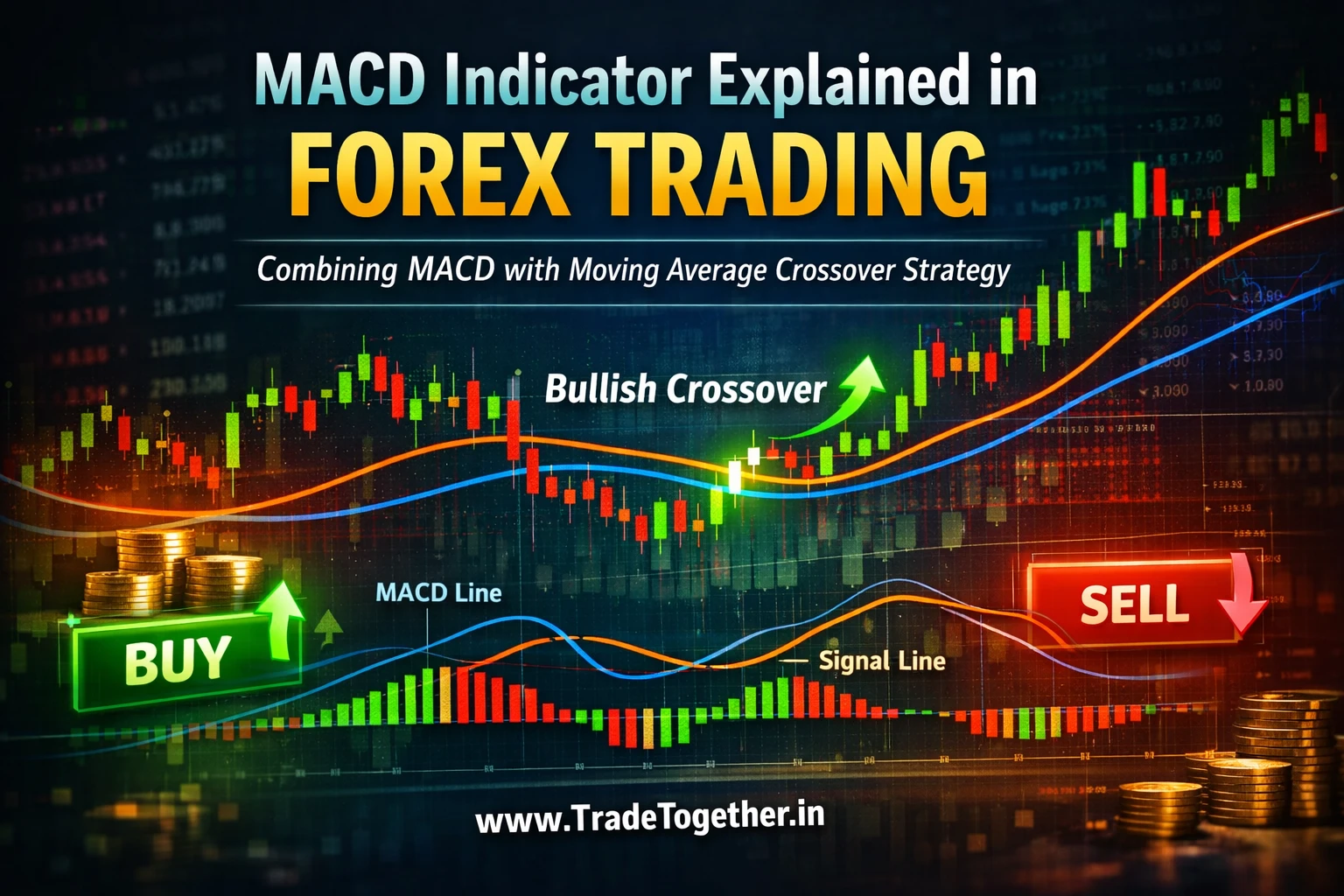
Chapter 17: MACD Indicator Explained in Forex Trading: Combining MACD with Moving Average Crossover Strategy
Wed Apr 01 2026
Introduction
In the previous chapter, we explored the Moving Average Crossover Strategy, where we learned how traders use moving averages to identify trends and potential market direction.
If you haven’t read that chapter yet, you can read it here:Chapter 16: Moving Average Indicator Guide: Understanding SMA, EMA and the Moving Average Crossover Strategy.
Moving averages help traders understand the overall trend of the market, but traders often combine them with momentum indicators to better understand how strong a move is and whether momentum is increasing or weakening.
One of the most widely used momentum indicators in trading is the MACD indicator.
In this chapter, we will study the MACD (Moving Average Convergence Divergence) indicator in detail. Instead of simply memorizing buy and sell signals, we will focus on understanding how the indicator actually works and the logic behind it.
When traders understand the logic behind an indicator, they can interpret signals more clearly rather than following them blindly.
Part 1 – What is the MACD Indicator?
What is MACD?
The MACD (Moving Average Convergence Divergence) indicator is a popular momentum indicator used in technical analysis to understand changes in market momentum and potential shifts in trend direction.
MACD helps traders identify when momentum in the market is strengthening or weakening, which can sometimes signal possible trend continuation or trend reversal.
MACD is often considered a leading indicator, meaning it can sometimes signal changes in momentum earlier than some trend indicators.
However, because it reacts quickly to price movement, MACD can also generate false signals, especially when markets are moving sideways or during periods of low volatility.
This is why understanding the logic behind the indicator is important.
Components of the MACD Indicator
The MACD indicator consists of three main components.
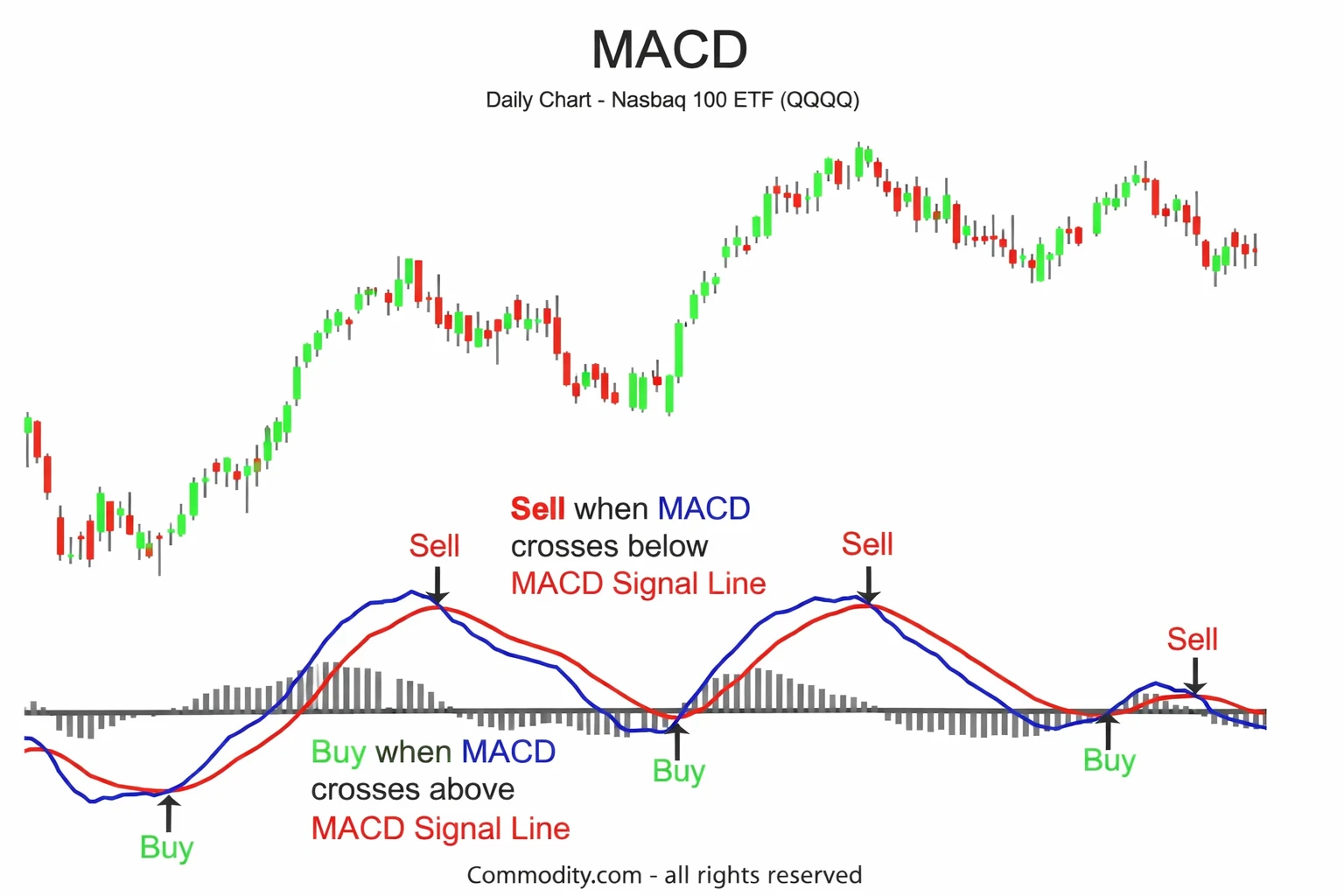
MACD Line
The MACD line represents the difference between two exponential moving averages.
Typically, the MACD uses:
- 12-period EMA
- 26-period EMA
This difference between the two averages shows the relationship between short-term momentum and longer-term trend movement.
Signal Line
The Signal Line is usually a 9-period exponential moving average of the MACD line.
It acts as a smoothing line that helps traders identify potential momentum shifts when the MACD line crosses it.
Histogram
The Histogram represents the distance between the MACD line and the signal line.
When the histogram expands, it indicates increasing momentum. When the histogram contracts, it indicates weakening momentum.
As you can see in the image above, these three components work together to visually represent changes in market momentum.
The Logic Behind MACD Signals
The MACD indicator works by measuring the relationship between two moving averages.
When short-term price movement begins accelerating faster than the longer-term average, momentum increases. This causes the MACD line to move away from the signal line.
When momentum slows down, the distance between these lines decreases.
Because of this behavior:
- When momentum strengthens, MACD moves upward.
- When momentum weakens, MACD moves downward.
Understanding this logic helps traders interpret signals more effectively instead of relying only on simple crossover rules.
Part 2 – Adding MACD on TradingView
To use the MACD indicator on TradingView, you can easily add it from the indicator library.
- Open your TradingView chart.
- Click on the Indicators section.
- Search for TradeTogether MACD.
- Select the indicator to add it to your chart.
You can also access the indicator directly here: https://www.tradingview.com/script/sDjlYMeO-TradeTogether-MACD/ .
Once added, the MACD indicator will appear in a panel below your price chart.
MACD Indicator Settings
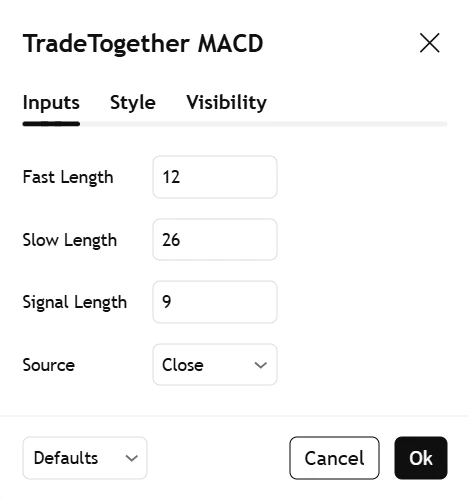
In the settings panel shown above, you can see the commonly used MACD parameters.
The default settings include:
- Fast Length: 12
- Slow Length: 26
- Signal Length: 9
- Source: Close Price
These settings are widely used in financial markets because they provide a balanced representation of short-term momentum relative to longer-term price movement.
For most traders, especially beginners, it is generally recommended to keep the default MACD settings.
Changing these values may make the indicator more sensitive, but it can also increase the number of false signals.
Part 3 – Using MACD in Real Trading
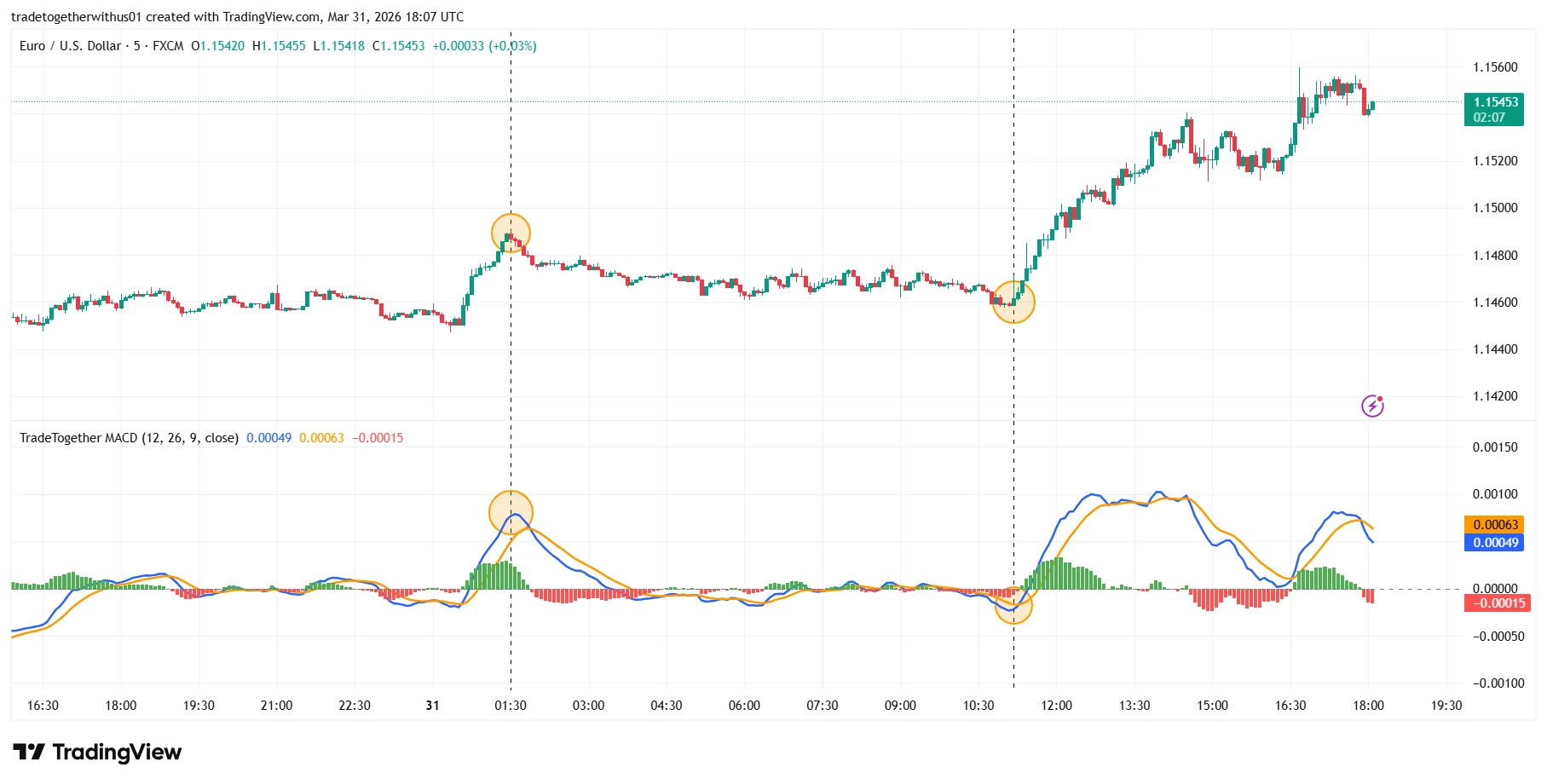
In the chart above, you can see how the MACD indicator behaves during real market conditions.
As you can observe in the image, the MACD line crosses the signal line and the histogram begins expanding. After this momentum shift, the price begins moving upward.
This example shows how MACD can help traders identify changes in market momentum, which sometimes occur before a strong price movement develops.
Because MACD reacts quickly to momentum changes, it is often described as a leading indicator.
However, traders must remember that no indicator works perfectly all the time. Market behavior can change due to volatility, liquidity conditions, and broader market sentiment.
Part 4 – Combining MACD with Moving Average Crossover Strategy
While the MACD indicator can help identify momentum changes in the market, it is important to remember that MACD is a leading indicator. Because it reacts quickly to price movement, it may sometimes generate signals that do not develop into a sustained trend.
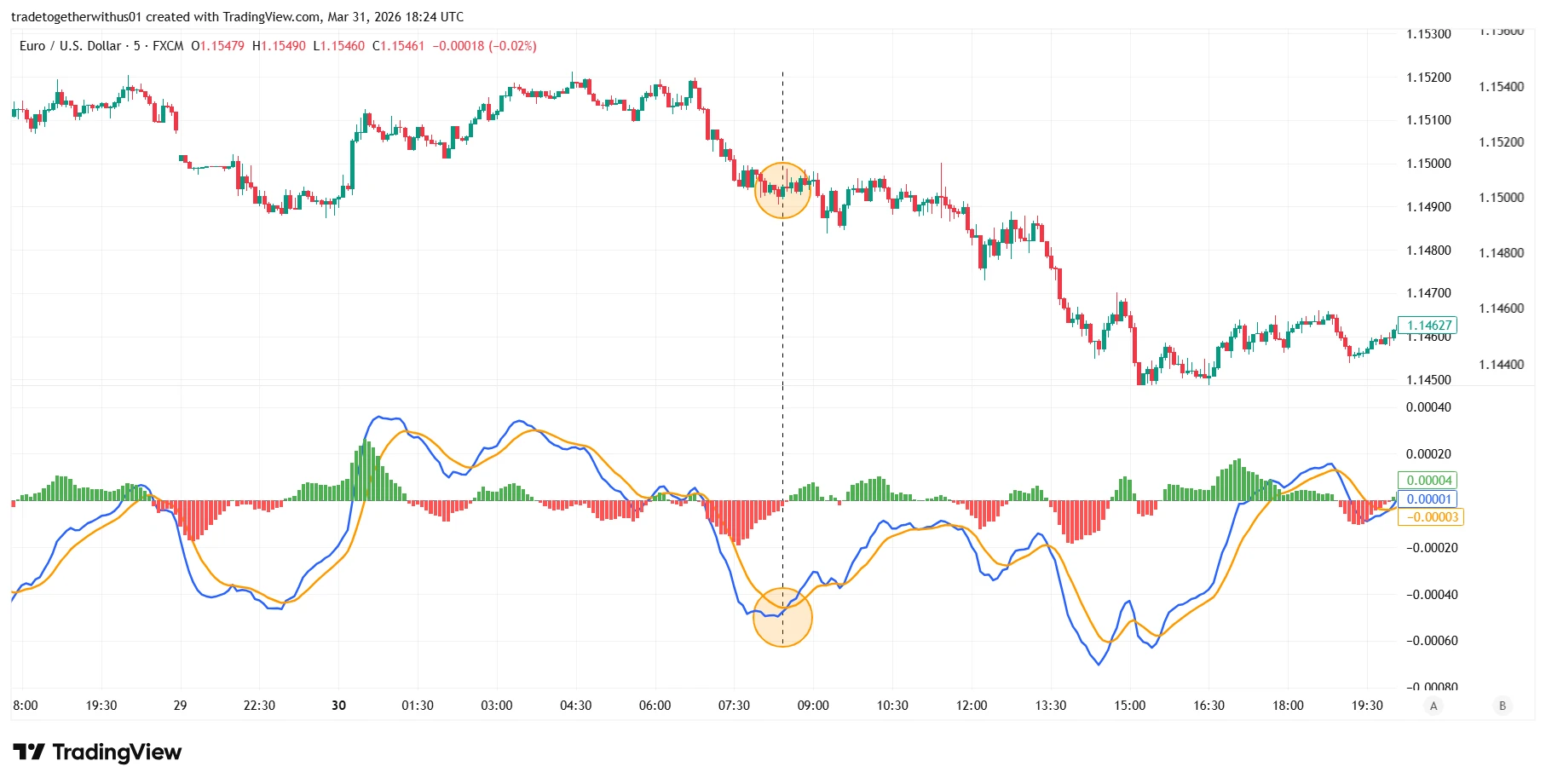
In the image above, you can see a situation where the MACD indicator suggests a signal, but the price does not continue moving in the expected direction.
This happens because MACD focuses mainly on momentum shifts, not necessarily on the overall market trend. Sometimes short-term momentum changes occur, but the broader trend does not support the move.
This is one of the reasons why traders often avoid relying on a single indicator.
To improve the interpretation of signals, traders can combine MACD with other tools such as the Moving Average Crossover Strategy, which we studied in the previous chapter.
Moving averages behave differently from MACD.
- MACD acts as a leading indicator, reacting quickly to changes in momentum.
- Moving averages act as lagging indicators, confirming the trend based on past price movement.
Because of this difference, combining the two indicators can provide additional context.
You can read that chapter here:Chapter 16: Moving Average Indicator Guide: Understanding SMA, EMA and the Moving Average Crossover Strategy.
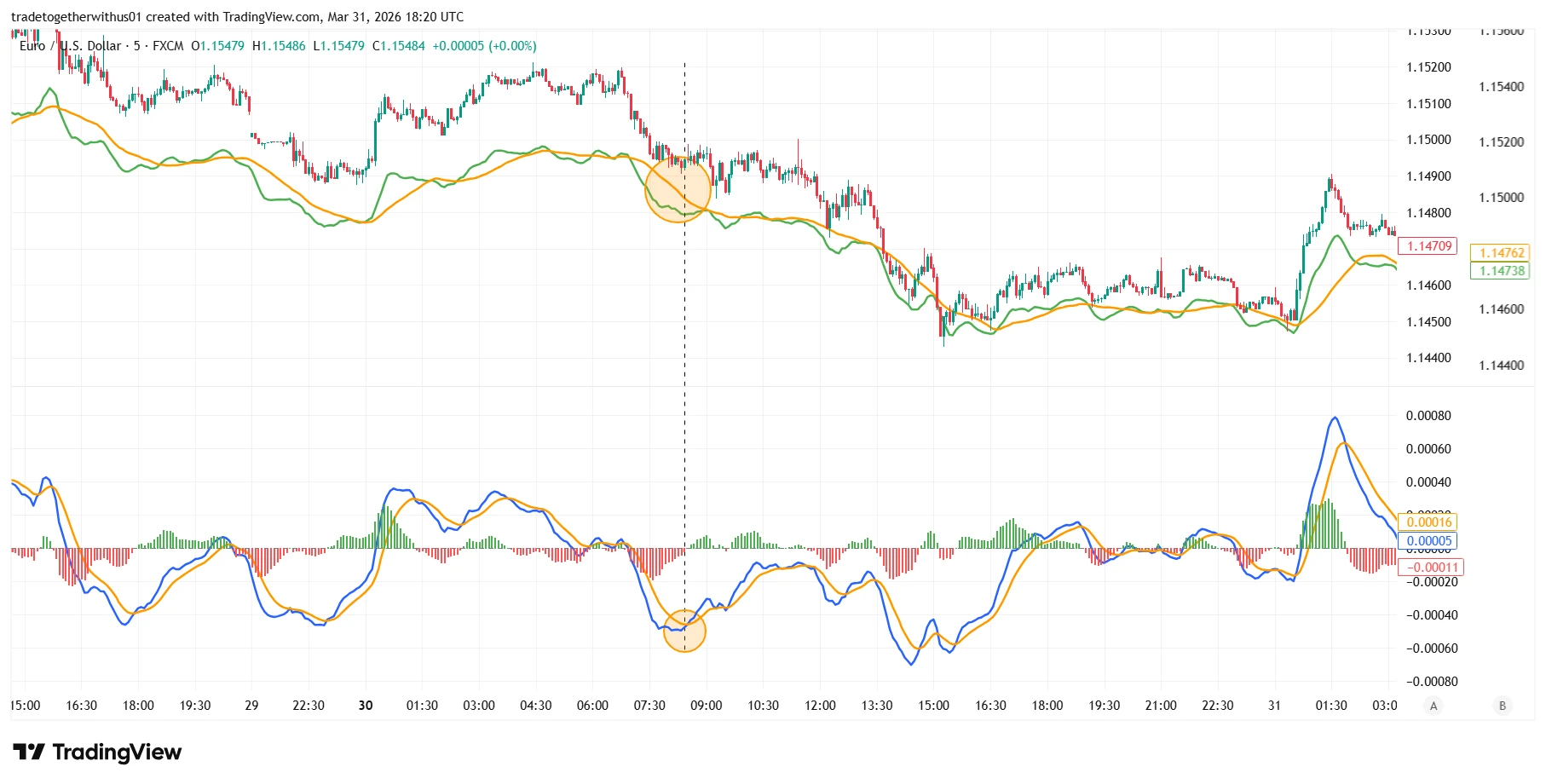
In the image above, you can see the same chart with moving averages added.
Even though MACD suggested a signal earlier, the moving averages did not show a crossover confirming the trend direction. This lack of confirmation suggests that the signal may not have strong support from the overall market trend.
By observing both indicators together, traders can identify situations where momentum and trend confirmation do not align.
When MACD signals appear but moving averages do not confirm the trend, traders may interpret this as a weaker signal or a potential conflict between indicators.
This does not mean that the trade will always fail, but it highlights the importance of confirmation and probability-based decision making in trading.
Combining indicators such as MACD and moving averages can help traders better understand whether momentum and trend direction are aligned, which may provide a clearer market perspective.
As always, traders should apply proper risk management and capital preservation, since no indicator guarantees a specific market outcome.
Conclusion
The MACD indicator is one of the most widely used momentum indicators in financial markets.
It helps traders understand changes in market momentum, which can provide insights into possible trend continuation or shifts in price behavior.
However, like all technical indicators, MACD works best when used as part of a broader analytical framework, including:
- Trend analysis
- Market structure
- Confirmation from other indicators
- Proper risk management
Combining MACD with moving averages allows traders to balance early momentum signals with trend confirmation.
It is important to remember that trading always involves uncertainty. Technical indicators should be used as analytical tools rather than standalone decision-making systems.
This content is provided for educational purposes only and should not be interpreted as financial advice.
FAQ
What does MACD stand for?
MACD stands for Moving Average Convergence Divergence, a momentum indicator that measures the relationship between two exponential moving averages.
Is MACD a leading or lagging indicator?
MACD is generally considered a leading momentum indicator, although it still uses historical price data.
Why does MACD give false signals?
MACD can generate false signals during sideways markets, low volatility environments, or sudden price fluctuations.
Can MACD be used alone for trading?
Using MACD alone is not recommended. Traders often combine it with trend indicators, market structure analysis, and risk management strategies.

Written by
Trade Together Research
Trade Together Research is a professional market analysis team providing forex, gold, and crypto trading insights, technical analysis, and educational guides.. Learn more about our research team on the About page.